JWTs: Simple Concept, Surprisingly Sharp Edges
JSON Web Tokens have a reputation for being easy to understand because the concept really is simple. A token is issued, passed around, and validated without the receiving party needing to call home to verify its legitimacy. Self-contained auth. It’s clean, and it’s nearly stateless.
Implementation, though, is not quite as simple. The claims, the edge cases, the renewal strategies. There is a lot of nuance.
I ran into all of it recently while building an email reports system that uses JWTs to handle auth between a central server and many remote client sites. This article is primarily about the practical implementation details and the gotchas I ran into along the way.
Anatomy of a Token (The Bits That Actually Matter)
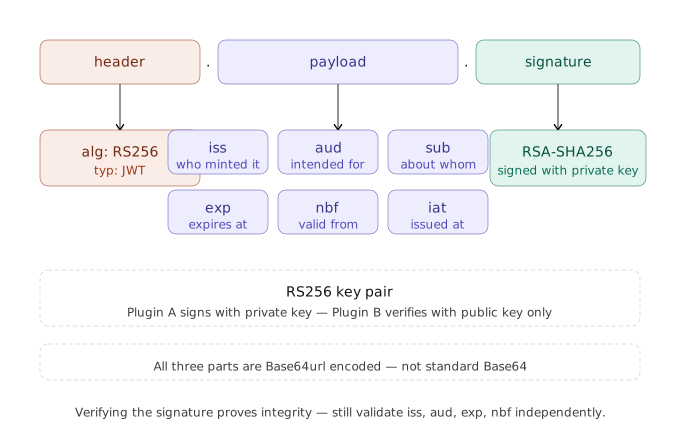
You’ve seen the breakdown: header.payload.signature. Three Base64url-encoded chunks separated by dots. The header declares the algorithm, the signature proves integrity, and the payload carries the claims. That part is straightforward.
It’s the claims where things get into the interesting territory.
iss – Issuer
This tells you who minted the token. The important word there is “tells”. It’s self-reported data in the payload, so it’s only useful if you’re actually validating it against something you trust.
In a server-to-client scenario, this matters a lot. If your central server issues tokens and remote clients accept them, those clients should be checking that iss matches a known, expected value. Without that check, any valid-looking token from anywhere could potentially be accepted.
// Issuer on the token-issuing side (central server)
$payload = [
    'iss' => $this->get_normalized_site_url(),  // e.g., 'myserver.com'
    'aud' => $client_site_url,                   // e.g., 'clientsite.com'
    'iat' => time(),
    'exp' => time() + ( 6 * HOUR_IN_SECONDS ), // 6 hours
];

// Validating iss on the receiving side (client)
$expected_iss = 'myserver.com';
if ( $payload['iss'] !== $expected_iss ) {
    throw new Exception( 'Token issuer is not trusted.' );
}
exp – Expiration
Probably the claim you’ll think about most. It’s a Unix timestamp representing when the token stops being valid.
The gotcha here is clock skew. If the server issuing the token and the server validating it have clocks that are even slightly out of sync, you can end up with a token being rejected the instant it’s issued, or accepted a bit after it technically expired.
Most JWT libraries let you configure a leeway value – a few seconds of grace – to account for this. In my implementation with medium-term tokens (6 hours), clock skew isn’t a practical concern, but if you’re using short-lived tokens or just seconds or minutes, this matters.
// firebase/php-jwt - set leeway globally
use Firebase\JWT\JWT;
JWT::$leeway = 10; // 10 seconds of clock skew tolerance
I didn’t implement leeway because my tokens live for hours, not minutes. Your tolerance will differ if you’re issuing tokens that expire sooner.
nbf – Not Before
It’s the counterpart to exp. Instead of defining when the token becomes invalid, it defines when it becomes valid. Useful if you’re issuing tokens ahead of time that shouldn’t be usable immediately, like pre-generating tokens for a scheduled task that runs later.
In my implementation, I did not make use of a nbf on the initial token generation, but the client-side validation checks for it if present. This gives me the option to add one later to enforce a minimum timeframe between stats polls.
iat – Issued At
Another one that tends to get ignored. iat records the timestamp of when the token was minted. On its own, it doesn’t enforce anything, but you can use it to implement max token age logic independent of exp. If you want to reject tokens that are more than X hours old, regardless of what exp says, iat is how you do it.
$decoded = JWT::decode( $token, new Key( $secret, 'RS256' ) );

$max_age = 4 * HOUR_IN_SECONDS;
if ( time() - $decoded->iat > $max_age ) {
    throw new Exception( 'Token has exceeded maximum allowed age.' );
}
I include iat in my tokens because it’s useful for debugging and auditing when a token was originally minted, separate from when it expires. I will be happy I did that in future when I need to rework or update the system.
sub and aud – Subject and Audience
These two work together to properly scope your tokens.
The sub claim identifies who the token is about. In my case, a unique site ID. aud identifies who the token is intended for – the client site URL. This distinction matters more than it first seems. A token that’s valid in one context shouldn’t automatically be valid in another. If a token is configured to read specific data, it should not be able to read other data. Or a read token should never be valid for write operations.
If your server issues tokens with aud set to one client site, and a different client site accepts tokens without checking the aud claim, you have a potential replay attack vector. A token stolen or leaked from one site can be used against another if the client does not verify that it is the intended aud.
The Gotcha Pile
alg: none Is Still a Thing
The JWT specification allows an algorithm value of none, meaning an unsigned, unverified token. This was intended for situations where security is handled at the transport layer, but in practice, it could be a source of real vulnerabilities in JWT libraries that didn’t explicitly reject it.
My implementation uses RS256 (asymmetric RSA signatures) and the client-side validation enforces this explicitly:
$algo = $header['alg'] ?? '';
if ( 'RS256' !== $algo ) {
    return false; // Rejects 'none', 'HS256', or anything else
}
Always make sure your library is configured to require a specific algorithm and to reject none. Don’t assume the default is safe; check if it is directly
My exact match compare I used in the code above does implicitly reject none as the algo but a more explicit check would look like this.
$algo = $header['alg'] ?? 'none'; // Assume none when the header is missing
if ( 'none' !== $algo ) {
    return false; // Rejects 'none' explicitly
}
RS256 vs HS256
This was a key architectural decision in my implementation. The two main algorithm choices are:
HS256 uses a shared secret. Both the issuer and the validator need to know the same key. That’s fine when you control both ends, but it means the secret has to live in two places. In a WordPress context, that might mean both sites need access to the same secret, stored in the options table or in an environment variable. Sometimes this is known as a pre-shared secret setup.
RS256 uses a public/private key pair. The issuer signs with the private key, and validators only need the public key to verify. The private key never leaves the issuing side. The private key always stays private, the secret is never shared, but the public key can decrypt something that is encrypted by the private key.
I chose RS256 because my system has a central server issuing tokens to many client sites. Distributing a public key is safe, it’s meant to be public. Distributing a single shared secret to dozens of client sites would be a security nightmare. One compromise on a client site – which you don’t control yourself – results in all sites being able to get spoofed.
// On the issuing server: sign with private key
$token = JWT::encode( $payload, $private_key, 'RS256' );

// On the client site: verify with public key
$decoded = JWT::decode( $token, new Key( $public_key, 'RS256' ) );
The trade-off is that RS256 requires more setup. Key generation on the server and distribution of keys to all clients. It’s also slightly more CPU-intensive for signature operations. That’s worth it from a security standpoint in a system like this.
Not Validating aud
This one is easy to miss because most JWT validation examples online only show you how to verify the signature and check exp. My initial reading of blog posts about JWTs didn’t mention it at all.
Validating aud is an extra step, and it’s easy to skip it if your library doesn’t make it the default.
A token being cryptographically valid is not the same as a token being valid for the thing you’re using it for. Don’t skip the audience check.
$expected_aud = 'clientsite.com';
$token_aud    = $payload['aud'];

// aud can be a string or an array depending on how it was issued, handle both situations
$aud_list = is_array( $token_aud ) ? $token_aud : [ $token_aud ];

if ( ! in_array( $expected_aud, $aud_list, true ) ) {
    throw new Exception( 'Token audience mismatch.' );
}
Base64url ≠ Base64
JWTs use Base64url encoding, not standard Base64. Base64url replaces + with - and / with _, and it omits padding characters. If you’re doing any manual token handling – debugging, logging, or building something custom – using a standard Base64 decoder will get you garbage output. It was one of my most confusing debugging experiences while testing.
My client-side validation manually implements Base64url decoding rather than relying on a library, specifically to handle this correctly:
private static function base64url_decode_strict( string $b64url ) {
    $b64 = strtr( $b64url, '-_', '+/' );
    $pad = strlen( $b64 ) % 4;
    if ( $pad ) {
        $b64 .= str_repeat( '=', 4 - $pad );
    }
    return base64_decode( $b64, true );
}
Token Renewal Without a Login Flow
This was the part that required the most thought for my email reports system. There’s no user sitting at a browser who can be prompted to log in again. Tokens expire, cron jobs run on a schedule. The renewal has to happen automatically.
The Problem
Short-lived tokens are good for security. But if a process is long-running or if a token expires between scheduled tasks, you need to handle it gracefully.
My tokens are long-lived in the sense that they will outlast the operation for which they are minted. Shorter tokens mean more frequent renewals, which in turn means less risk of theft or reuse, but more points of failure.
The Pattern I Built
The common pattern for JWT renewal is issuing both an access token and a refresh token to the client. The client holds both tokens, and when the access token expires, it presents the refresh token to get a new one.
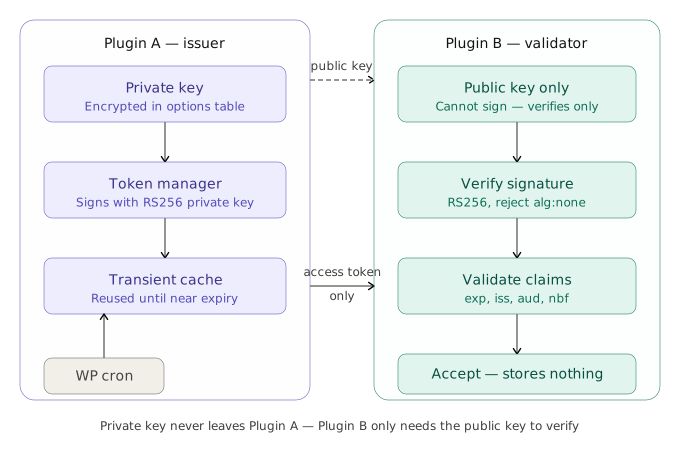
I didn’t do that. My architecture is server-centric and removed my need for refresh logic on the client:
- Server generates JWTs signed with its RSA private key
- Server stores the token temporarily alongside site registration info
- When a token is to be used near or after expiry, the server generates a NEW token
- Client receives tokens via API during initial registration but stores only the public key for verification
From the client’s perspective, it doesn’t manage token expiry at all. It just validates incoming requests using the public key. The server handles the entire lifecycle.
Tradeoffs
This simplifies the client considerably. There’s no token storage, no renewal logic, and no handling of refresh token expiry. The client is stateless except for the public key.
The tradeoff is that all the complexity moves to the issuing side, and if something goes wrong with token generation on the server, there’s no client-side fallback. Clients just start seeing auth failures and will need to reauth.
When Renewal Fails
The edge case worth thinking through is: what happens when the server can’t generate a new token?
In my implementation, renewal failures are logged to the server’s debug log. That’s it. There’s no email notification, no admin notice, no fallback mechanism.
This is something I’d change if I built it again. Silent failures in background processes are the worst kind. A renewal failure should trigger an alert – either an email to the admin or a dashboard notice – so it’s caught and fixed before clients start seeing auth errors.
What the logging I first added was like:
if ( ! $new_token ) {
    error_log( "Failed to generate new token for site {$site_id}" );
    return false;
}
The logging that I realised should look like:
if ( ! $new_token ) {
    error_log( "Failed to generate new token for site {$site_id}" );

    wp_mail(
        get_option( 'admin_email' ),
        'JWT Renewal Failure - Action Required',
        "Token renewal failed for site {$site_id}. Check server logs and verify key integrity."
    );

    return false;
}
The WordPress/PHP Reality
After spending time considering whether to build the entire thing myself or pull in a package, I had two popular options and decided to go with one.
Library Choices
The two main options in the PHP ecosystem are firebase/php-jwt and lcobucci/jwt.
firebase/php-jwt is simpler and has fewer dependencies. It gets the job done for most use cases and is easy to get started with. This is what I’m using.
lcobucci/jwt is more fully-featured and enforces stricter validation by default. Things like requiring iss and aud validation rather than making them optional. The tradeoff is a slightly more complicated API and more setup. For anything beyond a simple implementation, I’d lean towards lcobucci/jwt. I would use that package next time.
Storing Keys and Tokens
A few options in WordPress:
- Options table – simple, persistent. Good for keys that need to survive server restarts.
- Transients – built-in expiry, automatically cleaned up. Good for cache data, less ideal for anything security-critical.
- Custom database tables – full control, useful when you need complex queries or large volumes of data.
In my implementation:
- Private key lives in the options table of the server, encrypted with AES-256-CBC using a secret derived from WordPress salts
- Public key lives in the options table of the server and the client (unencrypted, it’s meant to be public)
- Generated tokens are stored in a custom database table alongside site registration data, I am considering in future not ever storing the token at all and isntead generating it on the fly
- Clients store nothing except the public key in their local options table
HTTPS Is Non-Negotiable
JWTs are bearer tokens. Whoever holds the token can use it. If the token is transmitted over plain HTTP, it can be intercepted and replayed. There’s no workaround for this – HTTPS is a hard requirement.
In WordPress, HTTPS enforcement is typically done at the web server level or via settings. My plugin code doesn’t enforce HTTPS programmatically, which is a gap – defensive checking would be better than relying on environment configuration.
Debugging Without Leaking Tokens
When something goes wrong, you’ll want to log enough information to diagnose the issue. The temptation is to log the full token, but that’s a security problem – especially if logs end up in places with broader access.
Log the claims, not the token itself. The payload is usually safe to log (it’s not secret data, just metadata in most cases). The signature is what you don’t want floating around in log files.
// Safe: log claims for debugging
error_log( 'JWT generated for site ' . $site_url . ' expiring at ' . gmdate( 'Y-m-d H:i:s', $exp ) );

// Unsafe: logging the full token
error_log( 'Generated token: ' . $token );  // DON'T DO THIS
My implementation logs metadata (site URL, expiry timestamp, etc) but never logs the token string itself.
What I’d Do Differently
A few things I’d change if I were starting from scratch:
I’d pick lcobucci/jwt from day one. I started with firebase/php-jwt because I knew it from previous work. It’s fine, but I ended up manually implementing checks that lcobucci/jwt enforces automatically. Retrofitting stricter validation is more work than building it in.
I’d define the token schema before writing any code. The claims I needed evolved as I built – scope got added later, audience validation got tightened up after the fact. Having a clear spec of which claims are issued and validated, and what happens if any fail, would have saved some refactoring.
I’d consider issuing a refresh token to the client. Keeping renewal entirely server-side made the client simple, but it also left it helpless when renewal fails. It just starts seeing auth errors with no way to recover on its own. For anything beyond a controlled two-party setup, that tradeoff might not be worth it. A client holding a refresh token could attempt to renew it before giving up, making the whole system more resilient.
I’d build the renewal failure notification earlier. The happy path: tokens renew silently, everything works. This got built and tested thoroughly. The path where renewal fails, and someone needs to know about it, was an afterthought. In a background process, that’s backwards. Failure modes should be top of mind. I had to add unit tests to cover failure cases and then build on them for failure handling.
I’d implement clock skew leeway for short-lived tokens. My tokens don’t need it, but if I ever switch to shorter lifetimes, clock skew will bite me. Setting JWT::$leeway = 60 is trivial and I should have done it from the start.
Wrapping Up
JWTs are a good fit for server-to-client auth in a distributed system. Stateless, verifiable without a database lookup on every request, and flexible enough to encode whatever context you need. The concept is sound.
The implementation is where it gets interesting. Validate every claim that matters. Choose your algorithm with intent. Think through your renewal strategy before you need it. And make sure your failure modes are as well-designed as your happy path.
Testing Your JWT Implementation
Not testing JWTs means discovering your validation is broken after it’s broken for users. The core test strategy is simple: generate tokens, intentionally break them, and verify they’re rejected.
Setup
class JWTTest extends WP_UnitTestCase {
    private $private_key;
    private $public_key;
    private $site_url = 'https://example.com';
    public function setUp(): void {
        parent::setUp();
        // Load your key generation or fixture
        $this->private_key = file_get_contents( dirname( __FILE__ ) . '/fixtures/private.key' );
        $this->public_key = file_get_contents( dirname( __FILE__ ) . '/fixtures/public.key' );
    }
}
Test Token Generation
Verify that tokens are generated with the expected claims.
public function test_token_includes_required_claims() {
    $payload = [
        'iss' => $this->site_url,
        'aud' => 'https://client.com',
        'iat' => time(),
        'exp' => time() + HOUR_IN_SECONDS,
    ];
    $token = JWT::encode( $payload, $this->private_key, 'RS256' );
    $decoded = JWT::decode( $token, new Key( $this->public_key, 'RS256' ) );
    $this->assertEquals( $this->site_url, $decoded->iss );
    $this->assertEquals( 'https://client.com', $decoded->aud );
}
Test Token Rejection (The Important One)
Test that invalid tokens are rejected. These are the security-critical tests.
public function test_expired_token_is_rejected() {
    $payload = [
        'exp' => time() - 100,  // Already expired
    ];
    $token = JWT::encode( $payload, $this->private_key, 'RS256' );
    $this->expectException( ExpiredException::class );
    JWT::decode( $token, new Key( $this->public_key, 'RS256' ) );
}
public function test_wrong_audience_is_rejected() {
    $payload = [
        'aud' => 'https://trusted-client.com',
        'exp' => time() + HOUR_IN_SECONDS,
    ];
    $token = JWT::encode( $payload, $this->private_key, 'RS256' );
    // Validate for a different audience
    try {
        $decoded = JWT::decode( $token, new Key( $this->public_key, 'RS256' ) );
        // Manual aud check (or use library enforcement)
        if ( $decoded->aud !== 'https://untrusted-site.com' ) {
            throw new Exception( 'Audience mismatch' );
        }
        $this->fail( 'Should have rejected audience mismatch' );
    } catch ( Exception $e ) {
        $this->assertStringContainsString( 'Audience mismatch', $e->getMessage() );
    }
}
public function test_algorithm_none_is_rejected() {
    // Manually craft a token with alg: none (the security gotcha)
    $unsigned = base64_encode( json_encode( [ 'alg' => 'none' ] ) ) . '.'
              . base64_encode( json_encode( [ 'iss' => 'attacker' ] ) ) . '.';
    $this->expectException( Exception::class );
    $this->validate_algorithm( $unsigned, 'RS256' ); // Your validation function
}
Test Tampered Tokens
A tampered token should fail validation.
public function test_tampered_payload_is_rejected() {
    $payload = [ 'iss' => $this->site_url, 'exp' => time() + HOUR_IN_SECONDS ];
    $token = JWT::encode( $payload, $this->private_key, 'RS256' );
    // Tamper with the payload
    $parts = explode( '.', $token );
    $parts[1] = base64_encode( json_encode( [ 'iss' => 'attacker.com' ] ) );
    $tampered = implode( '.', $parts );
    $this->expectException( SignatureVerificationFailedException::class );
    JWT::decode( $tampered, new Key( $this->public_key, 'RS256' ) );
}
Test Token Renewal
If you’re renewing tokens, verify the renewal logic.
public function test_renewal_generates_fresh_token() {
    $old_token = JWT::encode(
        [ 'iss' => $this->site_url, 'exp' => time() - 100 ],
        $this->private_key,
        'RS256'
    );
    // Your renewal function
    $new_token = $this->renew_token( $old_token );
    $decoded = JWT::decode( $new_token, new Key( $this->public_key, 'RS256' ) );
    $this->assertGreaterThan( time(), $decoded->exp );
}
Run and Iterate
vendor/bin/phpunit tests/JWTTest.phpStart with the negative tests (expired, wrong audience, tampered). Once those pass, add generation tests. The goal isn’t 100% coverage – it’s confidence that your validation actually rejects what it should reject.
Most JWT bugs hide in the edge cases: expiry boundaries, audience mismatches, and algorithm confusion. Those are the tests worth writing first.